
It’s finally here, the next big thing-Augmented Reality (AR) AR is finally moving from ‘a neat idea’ to ‘a necessary tool.’
Like any new technology, AR has gone through its awkward teenage years; clumsy, hasn’t grown into its ears, and doesn’t quite know what it wants to do with its life. It’s no different than the likes of portable computing, the smart phone, or any other modern technological marvel. (here’s a hilarious slide show of the early life of portable computing from itworld.com)
AR is finally coming into focus for many companies. People in various roles are starting to see how AR can reduce human errors, simplify the transfer of information, and provide insight to end users and managers alike. And I’m not even going to get into the endless possibilities involving customer engagement and experience. When a technology moves from video games and parlor tricks into serious applications like technical publications, assembly instructions, maintenance and support, and plant operations…it’s arrived.
Computing power and hardware has all but caught up to the demands of AR applications. Your company should either have, or be working on a strategy to take advantage of AR. If you don’t believe me, then maybe you’ll believe the Harvard Business Review. EAC Product Development Solutions is here to support your adoption of Augmented Reality and other Internet of Things (IoT) smart connected operations and product applications. Whether you’re getting a plan together, trying to obtain buy-in from the rest of your organization, selecting the right software platform, implementing a solution, or developing ‘experiences’ (that’s what AR and IoT applications are typically called); we’re here. We have teams of experts to make sure you successfully transform the way you design, manufacture, connect to, and service your products and organization.
As the leading PTC North American partner we offer our customers all of PTC’s technology solutions: ThingWorx, Windchill, Creo, Arbortext, Vuforia, Mathcad, etc. We also have a deep knowledge of the tools, applications, and configurations. This allows us to provide first-class consulting, implementation, and support services to ensure people like you are successful. Give us a call.
Part II – (You can read part 1 here) Evolving your BoM strategy, tools, and abilities. “EBoM vs. MBoM” transforms into “EBoM integrates with MBoM.” This integration includes associativity to one another, time saving tools, elimination of error prone manual steps & more.
Imagine eliminating the common disjointed processes, additional time, and error prone manual steps involved in the creation of downstream BoMs from Engineering into Manufacturing, Production and Service management.
Concepts & examples such as Manufacturing Bill of Materials (MBoM) are shown below, all under one system, integrated & associated, and created with a single click. Then they’re easily edited to meet downstream BoM needs.
BoM creation can be streamlined & improved by associatively creating downstream BoMs (S or M or other) and eventually, connecting them to your ERP system. For now, we’ll focus on the first step of this business transformation concept; the creation of the second, or downstream M or SBoM, starting with a simple EBoM example, created in minutes, and easily viewed & tracked.
Who should be involved in this topic at your company? Ideally, your Configuration Manager role should be leading or heavily involved in this process.
The starting point & tool is PTCs Windchill and your willingness to change & improve.
Once your CAD data is ready to check into Windchill, there is an option (check box) to auto-associate the EBoM to a downstream BoM such as an MBoM. It is a 1:1 relationship for starters. Options can branch out from here into many CM (Configuration Management) directions. Such as multi-level BoM management, uses, visualization and more.
Once created, you can manipulate & edit the default 1:1 downstream BoM to your needs; adding bulk items, manufacturing specific sub assemblies, (build throughs) even new service end items. You can also flatten out an EBoM to meet assembly or production needs. BoM items such as adhesive, lubricant, paint or coatings, packaging items, all things that typically are not on an EBoM, can and do belong on the M or SBoM.
If this fits your company’s needs? consider using Windchill’s auto-associate feature.
This article covers a couple examples. If this is not deep enough…here are even more tools to consider. Topics such as creating associated manufacturing instructions, work instructions, work plans and more. Change Management is shown as reference only, it is an optional element of Windchill for another blog.
There are many options to this topic, these are common examples that fit a lot of needs and is considered a starting point.
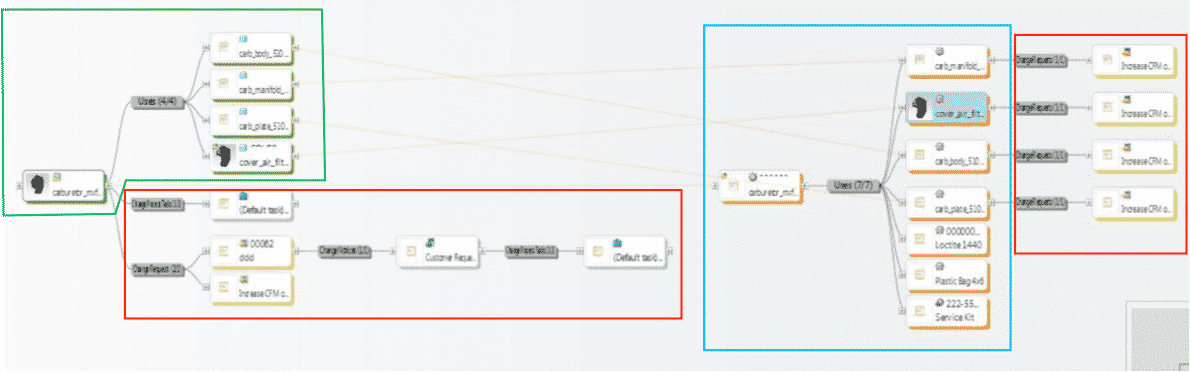
1stexample shows all BoM & change components all connected in one system vs. manually done in silo fashion, which is industry’s most common method today. These examples are shown in PTCs Windchill reference viewer tool, which ties all related objects into view for easy visibility with just a few clicks.
- 1. EBoM structure (highlighted in green)
- 2. Change requests, notices and tasks (highlighted in red)
- 3. MBoM structure (highlighted in blue) with their own, or connected Change Management Requests, Notices & Tasks
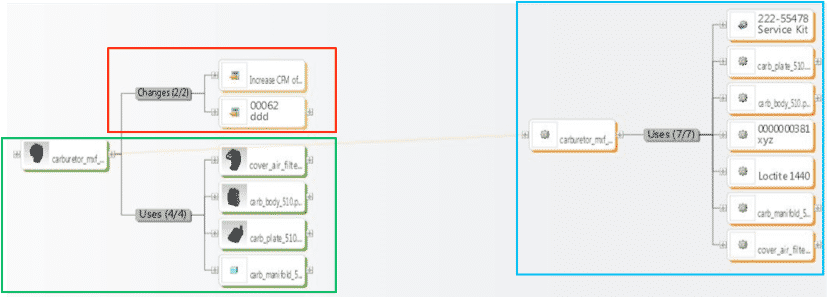
2ndexample shows an EBoM, SBoM (Service Kit in this example), with a saleable end item service kit, as well as components for service or manufacturing BoMs. It also shows Changes, these can also be created, edited, routed, approved or rejected, and even include the SBoM if need be.
Please connect with EAC to learn more, to discover your company’s transformation opportunities with an assessment, maybe see a demo, or attend a webinar. The goal is to help your company transform how you design, manufacture, connect to and service your products.
1. Why do I need to do regular maintenance on my PTC Windchill system?
Critical systems, like Windchill PLM, must be available to users. This is why it is so important to do regular maintenance on your PTC Windchill system. Windchill system outages can be costly and impact system adoption and usage. Therefore, it is recommended that you complete regular, preventative maintenance to identify and resolve issues before they cause performance problems or service interruptions.
2. What is included in the Alliance program?
We start by assessing your department and company’s needs. We combine the assessment results with our understanding of successful Windchill implementations and deliver recommendations and a plan for a stable, high-performance Windchill instance. The flexibility of the Alliance program allows us to configure an engagement as needed. This gives us the ability to tailor the program specifically to your company.
3. Can my staff complete the Windchill maintenance activities?
Certainly! Keep in mind that preventative Windchill maintenance tasks are commonly an afterthought, and other projects are likely to take precedence. As the staff becomes busier, their dependence on a functioning Windchill system increases. These would be times when a system outage during a critical project could prove to be disastrous.
4. Can you train my staff to complete Windchill maintenance tasks?
Yes, in fact we would love to help train your staff how to complete Windchill maintenance tasks. EAC has PTC certified instructors that are available to deliver all of the Windchill Business and System Admin training courses offered by PTC. After attending these classes your staff will be ready to take on their new Windchill responsibilities. Additionally, we can provide mentoring with our Windchill experts to answer all of your Windchill maintenance questions.
5. What are some benefits of using the EAC Alliance program?
One of the core benefits of the EAC Alliance Program is the ability to take a proactive approach to maintaining your Windchill system – ensuring high availability and performance. By completing regular system maintenance and software updates you are able to better leverage your PTC investment. You can also eliminate the need to maintain a staff of Windchill Administration experts by assigning these system and business admin tasks to our EAC’s expert consultants. Our Windchill consultants have years of experience and complete these same activities on a daily, weekly and monthly basis for many Alliance Program customers.
6. Are Windchill system updates and upgrades included in the Alliance Program?
Yes, the EAC Alliance Program can be structured to include Windchill system updates and upgrades. When you include this in your Alliance Program you can easily budget a fixed cost over the upcoming months and years.
7. Can you support my Global company?
Yes. While EAC is based in the United States, we are part of the PTC Strategic Partner network giving us access to many additional resources overseas. We call on these partners to help with implementation, training, and support services local to international facilities.
8. Are you able to provide 24/7 Windchill support?
Yes. We can provide your company access to our support case submission system, which will allow your Windchill users to log cases at any time of day. If emergency Windchill support is required (noted by the priority level assigned to your case), our team will be notified immediately and begin support. If you require overseas support, and international support is included in your Alliance Program agreement, we will coordinate with a local PTC partner to address the issue.
9. Doesn’t my PTC Maintenance agreement include similar Windchill services?
No. Your PTC maintenance agreement covers all Windchill updates to software that you have purchased as well as technical support should you have a problem that requires resolution. It does not include the services necessary to update, upgrade and maintain your Windchill system.
10. How much does the EAC Alliance Program cost?
This varies based on the complexity of your Windchill environment and the level of support you would like to include in your service level agreement (SLA). This can be determined by having a quick conversation with your team and proposing a solution that correctly addresses your needs. Contact us today for further information!
Having more technical illustrations than information is beneficial in many ways—and the solution to do so is easier than you think.
Here’s why you should be using more technical illustrations and the best way to create them.
Technical Illustrations are Easy to Understand
We all know the saying “ a picture paints a thousand words”—and in this case, it’s more than true.
It’s much easier to interpret a picture than to understand and read through lots of text. Using illustrations in tech pubs, user manuals, and service manuals reduce user errors.
Illustrations Take Away the Need for Text
Have you ever bought anything from Ikea? Sure you have! They sell their flat pack furniture all over the globe using the same manuals. That is the power of illustrations. You can drastically reduce the amount of text that is needed by producing illustrations.
Using Technical Illustrations Reduces the Need for Translation
With less text that is needed or used, you can reduce your translation costs.
So Why Doesn’t Everyone Use Illustrations?
The traditional process to create illustrations is time-consuming and can be froth with problems.
Let me illustrate it for you.
Odds are if you are using the traditional illustration process, your technical illustrators most likely work with engineers to get snapshots of CAD information to use in illustrations.
These snapshots are usually static because they are captured at only a moment in time, usually near the end of the product development process.
Because the illustrations are static, they are not always easy to interpret. This means the text is still required to properly convey the information.
If your snapshots were taken at the end of the product development process because there was ‘ less likelihood of the product changing’ – you could be delaying your shipment process.
Often a product cannot ship until the technical information that is associated with it is ready to ship with the product.
Now consider all the back and forth communication between both the engineering department and the illustration group.
Traditional illustrations are difficult to keep up to date. Commonly the illustrator needs to go back to the engineer for updates every time there is a change to the product.
If at any time there is a miscommunication, your illustrations could easily become inaccurate; exposing your organization to the risk of unsatisfied customers, frustrated field technicians, and the possibility of lawsuits.
It’s easy to see why the traditional methods to create illustrations are downright time consuming and prone to error.
So How Can You Make Technical Illustrations Easily?
The answer is Creo Illustrate.
Creo Illustrate leverages CAD data to create illustrations that, depending on your PDM/PLM setup, maintain an associative link to the original CAD data.
This means any changes you make with your CAD data can automatically update all your illustrations and possibly your publications.
With Creo Illustrate you have the ability to start creating illustrations early on in the product development process, with a guarantee that your illustrations are always kept up-to-date. Start developing product documentation during the product development process instead of after the product development process.
See Creo Illustrate in action! Watch this short video.
Here’s why engineering processes affect services and why streamlining information could solve the whole problem.
The Problem: Lack of Communication
Let’s be honest, engineering and manufacturing departments do not always communicate product changes to service. This is just the start of how your engineering processes affect services.
The Result: High Costs
When technicians reference outdated product information and arrive with incorrect parts, this leads to longer service visits, extraneous costs, longer downtime, and lowered customer satisfaction.
The Solution: Streamlining Information
Streamline the way you service teams access and use product information. The best way to accomplish this involves accurately transforming eBOMs (engineering bill of materials) to sBOMs (service bill of materials) and maintaining the fidelity of that information after engineering changes.
It’s time to stop letting your engineering processes affect services.
Take full advantage of the product data your organization has already created.
Structure service manuals and part information based on how a specific product is configured and serviced. Reuse engineering and manufacturing data in the service environment. Provide configuration-specific information to service technicians. Create a single point of access for your service content. Avoid text – use and repurpose graphics, animations, and CAD information when possible. And link service information to engineering information so changes propagate.
Next: Identify Your Service Needs
Identify what should go in your sBOM to ensure your sBOMs meet the needs of the service department. Examples might include what is serviceable versus what is replaceable, the status of a part, the components, models, grouped items, and more.
The Goal: Transforming Your Services
Remember: the ultimate goal is to make your customers happy. As a result of combining best practices with the right technology to support service and parts information management and publication you will see a higher customer satisfaction, improved technician effectiveness, improved brand reputation, higher profitability (due to lower revenue and service cost), time savings, and higher revenue (from repeat business and customer loyalty).
We have a team of technical communications specialists that would love to talk with you about your current state and current initiatives.
Help us help you! We know your Windchill System is critical, that’s why we designed a program just for you.
Some estimate that 70% of companies do not regularly perform routine maintenance on their Windchill System. Were on a mission to change that.
In an effort to provide on-going technical support, business process consulting and adoption services; EAC offers the Windchill Alliance Program (Services). This is a service package intended to provide professional Windchill maintenance and administration services, regardless of a customer’s stage of adoption.
Our team of expert technicians will improve your system performance, optimize server and license configurations, and ultimately maintain a stable PLM environment for your organization.
After receiving your FREE Windchill System Checkup and becoming a customer, here’s what you will receive:
System and Application Administration
This includes everything from starting and stopping your Windchill environment to cleaning up unreferenced files and cache folders. Let our team do the busy work of monitoring and managing your system so you can get the most out of your Windchill investment.
Database Administration
The EAC Alliance team will review, restore, and analyze your database growth and performance. Our database administration covers anything and everything from network administration, security administration, and backup services. Put us in-charge of performing and verifying your scheduled system backups to ensure your system is running properly.
Business Administration
We will take care of all your Windchill business administration needs such as adding new roles, updating accounts, operating system maintenance, network administration, license usage reporting and more.
End-User Support
Our end user support consists of everything from help desk support, to advice on best practices, to user mentoring, to Alliance Program review meetings and more. We want to help you with all your system questions and needs.
Still want to learn more? Check out our article on the Top 10 Questions we get about our EAC Alliance Program.
Also, Here’s what customer’s see with our Windchill Managed Services and what you can expect as an EAC Alliance Customer!
Our goal is to help you increase your Windchill system uptime, eliminate corrupt workspaces, improve sluggish system performance, safeguard your security, and guarantee your system is up-to-date. Take a proactive approach to maintaining your Windchill environment today!
